 Skip to content

Your Facebook and Instagram advertisements are getting clicks, people are visiting your website, and your campaign appears to be reaching the right audience. But when you check your orders, the results are disappointing.
If your Meta Ads are generating clicks but no sales, increasing your advertising budget may not solve the problem. The issue could be incorrect conversion tracking, an unconvincing offer, creative that attracts attention without purchase intent, or a website that makes buying difficult.
To understand how these advertising activities fit into a broader strategy, explore our guide to Meta Ads and social media marketing for retail businesses, which explains how retailers can use social platforms to build visibility and customer relationships.
This is a common challenge for retail businesses in Pakistan, particularly fashion brands, cosmetics stores, jewellery businesses, electronics retailers, and e-commerce shops.
The important thing is to identify where potential customers are dropping off before making changes to your campaigns.
In this guide, we will examine four common problem areas and explain how to diagnose and fix them to improve your Meta Ads performance.
Why Do Meta Ads Get Clicks but No Sales?
Getting clicks means people are responding to your advertisements. However, a click does not necessarily indicate that someone intends to purchase.
For example, a clothing advertisement might attract attention because of an attractive model or a visually appealing product. A visitor clicks to explore the collection but leaves after discovering that the price, sizing, or delivery options do not meet their expectations.
The advertisement successfully generated interest, but something prevented the purchase.
Before changing your campaign, understand the four main areas that influence conversions:
- Tracking: Are purchases being recorded accurately?
- Offer: Is there enough value to encourage customers to buy?
- Creative: Does your advertisement attract potential buyers or just attention?
- Website: Can visitors easily find information and complete their purchases?
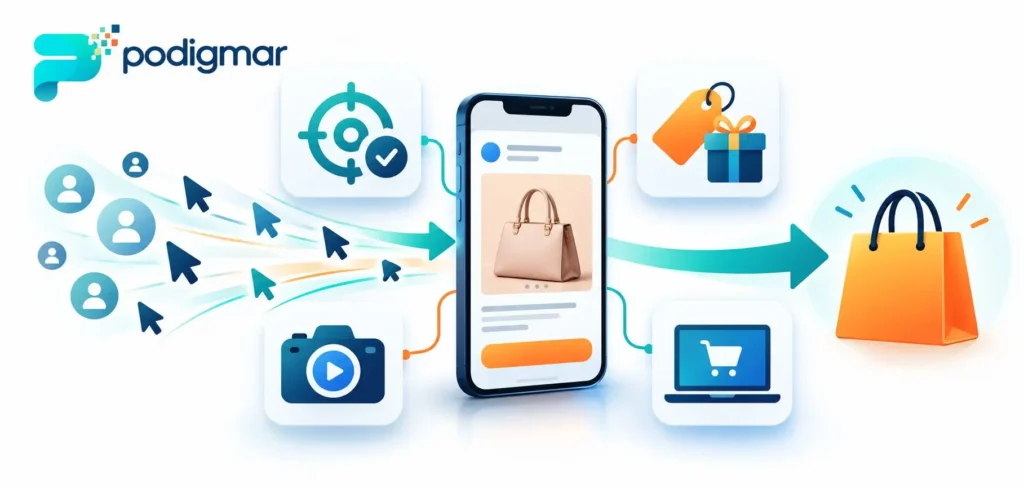
Checking these areas separately helps you identify the actual problem instead of making random campaign changes.
Check Your Meta Ads Conversion Tracking First
One of the first things to investigate is whether Meta is correctly recording purchases and other important customer actions.
Sometimes, a retailer receives orders through its website, but Meta Ads Manager reports few or no purchases. This can happen when the Meta Pixel is incorrectly installed, purchase events are missing, or conversion tracking is not configured properly.
In other situations, the tracking setup works correctly, but the campaign genuinely generates clicks without purchases.
You need to distinguish between a reporting problem and a real sales problem.
Common Meta Pixel Tracking Problems
The Meta Pixel helps track website actions and sends relevant event information to Meta.
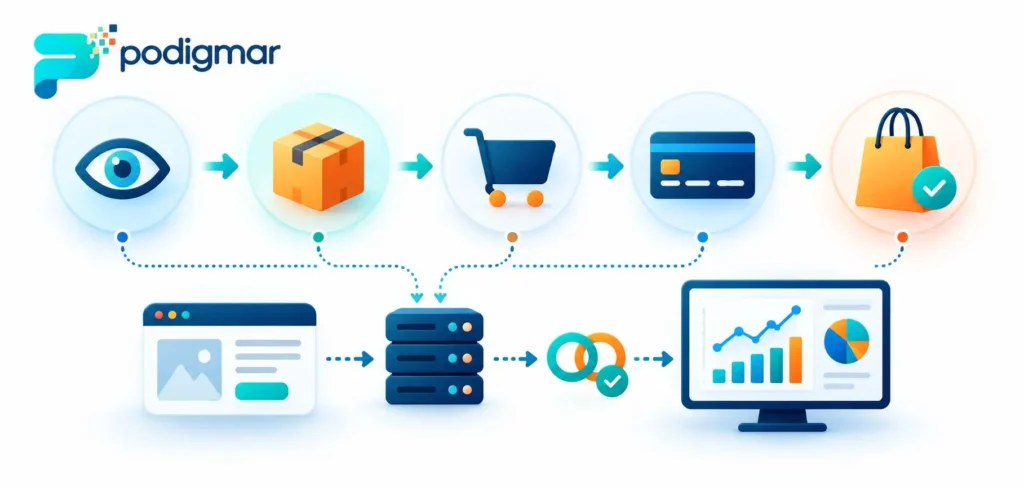
For an e-commerce business, important events can include:
- PageView: Someone visits a website page.
- ViewContent: Someone views a product or other relevant content.
- AddToCart: Someone adds a product to their shopping cart.
- InitiateCheckout: Someone starts the checkout process.
- Purchase: Someone completes a purchase.
If these events are missing, duplicated, or incorrectly configured, your advertising reports may not accurately represent customer activity.
How to Diagnose Tracking Issues
Start by reviewing your tracking setup.
- Open Meta Events Manager and select the relevant data source.
- Check whether your Pixel is receiving website events.
- Use the Test Events feature to review activity during a test purchase.
- Confirm that the Purchase event fires after a successful order.
- Check whether purchase values and currency are being passed correctly.
- Review browser and server event configurations if you use the Conversions API.
For WooCommerce stores, also check whether your Pixel integration or marketing plugin is correctly tracking completed orders.
The Meta Pixel and Conversions API can work together to improve event measurement. However, browser and server events must be configured carefully to avoid duplicate purchase reporting. Event deduplication is important when both sources send the same conversion.
Important: If your tracking is working correctly and actual orders are not increasing, do not assume the Pixel is responsible. Move on to the offer, creative, and website experience.
Your Offer Is Not Convincing Enough to Generate Purchases
Your advertisement might attract the right audience, but customers still need a reason to choose your product.
An attractive product photograph does not automatically communicate value.
Imagine a Pakistani cosmetics retailer running an Instagram campaign for a skincare product. The advertisement receives hundreds of clicks, but the product page provides limited information about ingredients, usage, product suitability, and delivery.
Customers may be interested, but they do not have enough information to make a confident decision.
Why Retail Offers Fail
Common problems include:
- Prices that are not competitive for the value offered.
- Unclear product benefits.
- Delivery charges revealed too late.
- Promotions with complicated conditions.
- No clear information about product quality.
- Discounts that fail to communicate genuine value.
A discount is not always the answer. Customers may purchase without one if they understand why the product is worth its price.
How to Improve Your Offer
Make the value of your product clear before customers reach checkout.
For example:
- A fashion brand can highlight fabric quality, sizing, and collection details.
- A cosmetics retailer can explain ingredients, product benefits, and usage.
- An electronics store can communicate specifications, warranty terms, and after-sales support.
- A jewellery business can highlight materials, craftsmanship, and product details.
You can also test relevant bundles, free delivery thresholds, seasonal offers, or introductory promotions.
Before introducing discounts, calculate their effect on your profit margins. More orders do not necessarily mean more profit.
Your offer should answer one important customer question: Why should I buy this product from your business?
Your Ad Creative Attracts Attention but Not Buyers
Creative quality has a major influence on how people respond to your advertisements.
However, an advertisement can generate strong engagement and still attract visitors who have little intention of purchasing.
For example, a fashion brand might publish a visually attractive video featuring trending music and professional editing. People watch, like, and share it, but the advertisement does not communicate the product price, available sizes, or a clear reason to purchase.
The creative is entertaining, but it does not support the buying decision.
Common Creative Mistakes
- Using attractive visuals without explaining the product.
- Focusing on entertainment rather than customer needs.
- Showing products without communicating their value.
- Using generic messages that do not differentiate the brand.
- Failing to include a clear call to action.
- Repeating the same creative for too long without evaluating performance.
How to Create Better Retail Ad Creatives
Start by understanding what customers need to see before purchasing.
Consider testing different creative approaches:
Product-focused creatives: Show the actual product, important features, available options, and relevant details.
Demonstration videos: Explain how a product works or how customers can use it.
Customer-focused content: Use genuine customer experiences, reviews, or demonstrations where you have permission.
Comparison creatives: Help customers understand differences between relevant products or options without making unsupported claims.
Offer-focused creatives: Communicate a genuine promotion, its conditions, and its benefits clearly.
Test different headlines, formats, visuals, and messages. Compare the quality of traffic and resulting purchases rather than selecting a creative based only on likes or low-cost clicks.
Your Website Is Losing Customers After the Click
Even a well-targeted advertisement cannot compensate for a poor website experience.
A customer might click your Meta advertisement because they like the product. However, if the product page loads slowly, the price is unclear, or the checkout process is confusing, they may leave without purchasing.
This is particularly important for Pakistani e-commerce businesses, where customers may also want to understand delivery times, payment methods, cash-on-delivery availability, and exchange policies.

Common Website Conversion Problems
Slow loading speed: Customers may leave before product information becomes available.
Poor mobile experience: Small text, difficult navigation, and badly displayed product images can make shopping frustrating.
Unclear product information: Missing descriptions, sizes, specifications, or photographs can create uncertainty.
Unexpected costs: Delivery charges or additional fees appearing late in checkout may discourage purchases.
Limited trust information: Missing contact details, unclear return policies, and insufficient customer reviews can reduce confidence.
Complicated checkout: Unnecessary form fields and confusing payment steps can prevent customers from completing orders.
How to Fix Website Conversion Problems
Review your website on a mobile phone, not just a desktop computer.
Check that:
- Product images are clear and relevant.
- Prices and product variations are easy to understand.
- Delivery charges and estimated delivery times are visible.
- Payment methods are explained.
- Contact and exchange information is accessible.
- Checkout forms are simple and functional.
- Customers receive clear order confirmation.
For WooCommerce retailers, place a test order and review the complete purchasing journey. Check whether cart, checkout, payment, and order confirmation work properly.
If visitors are adding products to their carts but not completing purchases, investigate the checkout process before increasing your advertising budget.
How to Identify Where Your Meta Ads Are Losing Customers
Instead of changing everything at once, examine the customer journey step by step.
| Customer Journey Stage | What to Investigate |
|---|---|
| Advertisement impression | Is the creative reaching relevant people? |
| Advertisement click | Does the message create genuine buying interest? |
| Product page visit | Does the page match the advertisement? |
| Add to cart | Are price and product details convincing? |
| Checkout | Are there unexpected costs or technical problems? |
| Purchase | Is the order completed and tracked correctly? |
This process helps you narrow down the problem.
For example, if visitors are clicking but very few are viewing product pages, investigate landing-page relevance and website loading. If many people add products to their carts but do not purchase, examine delivery costs, payment options, and checkout usability.
If purchases are happening but Ads Manager reports fewer conversions, investigate tracking and attribution.
Do not assume every problem requires a different advertising campaign. Sometimes the biggest improvement comes from fixing what happens after the click.
How to Optimise Meta Ads Without Wasting Your Budget
Once you identify the problem, make changes based on evidence rather than assumptions.
Follow these practical steps:
- Verify tracking: Confirm that important website events and completed purchases are recorded accurately.
- Review audience quality: Check whether your advertisements reach customers who are relevant to your products and delivery areas.
- Improve your offer: Make product value, pricing, and purchase conditions clear.
- Test new creatives: Experiment with product demonstrations, customer-focused messages, and different formats.
- Improve landing pages: Match the destination page with the advertisement and remove unnecessary obstacles.
- Monitor conversions: Evaluate purchases, acquisition costs, and revenue rather than relying on clicks alone.
To organise these improvements into a practical schedule, follow our guide on how to build a 90-day retail marketing plan in Pakistan.
Avoid making frequent changes to several campaign variables simultaneously. Give tests enough time and conversion data to produce useful conclusions.
Also, do not increase your advertising budget simply because your cost per click is low. A more expensive click can still be more valuable if it generates profitable customers.
Frequently Asked Questions
Your advertisements may attract people who are interested but not ready to purchase. Other possible reasons include weak offers, poor product pages, checkout problems, or incorrect conversion tracking. Review each stage of the customer journey to identify the issue.
Facebook Ads may generate clicks without purchases when the audience, creative, offer, or landing page does not match customer expectations. Check whether visitors view products, add items to their carts, and begin checkout.
Yes. Missing or incorrectly configured events, browser restrictions, and attribution limitations can cause reported conversions to differ from actual orders. Review Events Manager and compare advertising reports with your website and order records.
Not immediately. First, investigate tracking, audience quality, creative performance, offers, and website usability. Increasing expenditure before identifying the problem may generate more traffic without improving sales.
Yes. Facebook and Instagram advertising can help small retailers introduce products, reach relevant audiences, and generate purchases or enquiries. Success depends on targeting, creative quality, pricing, customer experience, and the ability to measure results.
Turn Your Meta Ads Clicks Into Retail Customers With Prodigmar
Getting clicks is only one part of successful advertising. Your Meta Ads should attract relevant customers and guide them towards a purchase.
If your Facebook and Instagram campaigns generate attention without enough sales, it may be time to review your tracking, advertising creatives, offers, and website experience.
At Prodigmar, we help retail businesses improve their digital marketing performance through Meta Ads, Google Ads, SEO, social media marketing, and conversion optimisation.
If your campaigns need better targeting, creative testing, and conversion tracking, explore our Meta Ads management services to discover how a more structured advertising approach can support your retail growth.
Improve Your Advertising and Retail Conversions
Get Your Free Retail Growth Audit to identify opportunities to improve your advertising and customer conversion process. Alternatively, book a 30-minute strategy call to discuss your advertising challenges and develop a more focused retail growth strategy.
Book Your Free 30-Minute Strategy Call

